
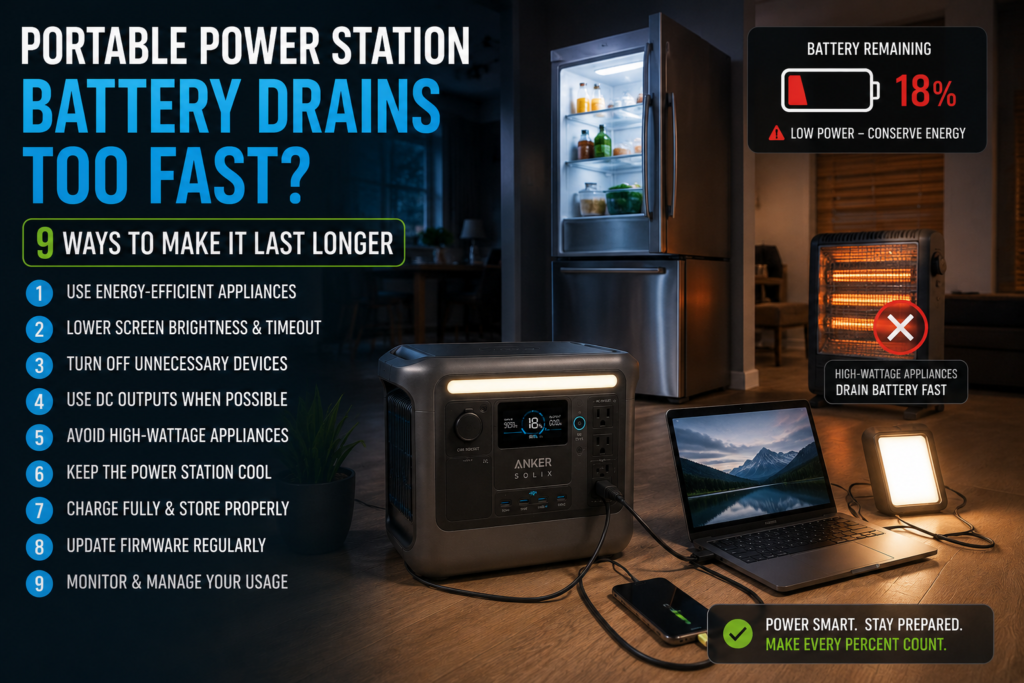
Have you ever charged your portable power station to 100%, only to watch the battery percentage fall much faster than expected? If your portable power station battery drains too fast, you’re not alone. Many owners assume their battery is defective when, in reality, the issue often comes down to power-hungry appliances, inverter losses, battery settings, or unrealistic runtime expectations.
Fortunately, most cases have simple explanations. In this guide, you’ll learn why portable power stations lose power faster than expected, how battery capacity really works, and nine proven ways to maximize runtime whether you’re camping, preparing for emergencies, or living off-grid.
Quick Answer
If your portable power station battery drains too fast, the most common causes include:
- Running high-wattage appliances
- Inverter efficiency losses
- Battery aging
- Cold temperatures
- Leaving AC output enabled unnecessarily
- Charging devices continuously
- Misunderstanding usable battery capacity
- Incorrect battery settings
- Faulty hardware or firmware
Most users can increase runtime significantly simply by reducing large electrical loads and managing power more efficiently.
Why Does a Portable Power Station Battery Drain Too Fast?
Many people compare a portable power station’s advertised watt-hour (Wh) rating with actual runtime. However, the advertised battery capacity is not the same as usable output.
For example, manufacturers typically measure battery capacity under ideal laboratory conditions. When you power AC appliances, part of that energy is lost during DC-to-AC conversion inside the inverter.
Customer experiences with the Anker SOLIX C1000 Gen 2 also reflect this reality. Several users noticed shorter runtimes when powering space heaters, coffee makers, pizza ovens, or microwaves. These are all high-demand appliances that can drain even a 1,000Wh power station surprisingly quickly.
In addition, manufacturers often estimate approximately 80–90% usable energy after conversion losses, depending on load type and operating conditions.
How Battery Capacity Really Works
A portable power station stores energy in watt-hours (Wh).
A simple runtime estimate is:
Runtime (hours) = Battery Capacity × Efficiency ÷ Appliance Wattage
For example:
| Appliance | Power Draw | Estimated Runtime (1024Wh Battery @ 85% Efficiency) |
|---|---|---|
| LED Light | 10W | ~87 hours |
| Wi-Fi Router | 15W | ~58 hours |
| Laptop | 60W | ~14 hours |
| Refrigerator | 70W average | ~12 hours |
| Television | 100W | ~8.5 hours |
| Microwave | 1200W | Less than 45 minutes (intermittent use) |
| Space Heater | 1500W | Around 30–35 minutes |
Real-world customer reports align closely with these estimates. For example, users reported that running a 1500W heater reduced battery capacity by roughly 50% in about 30 minutes, while powering a refrigerator averaged approximately half the battery over seven hours.
9 Ways to Make Your Portable Power Station Last Longer
1. Avoid High-Wattage Heating Appliances
Heating devices consume more electricity than almost anything else you can plug into a portable power station.
Examples include:
- Space heaters
- Coffee makers
- Electric kettles
- Hair dryers
- Toasters
- Portable ovens
Even premium 1000Wh models can lose half their battery in around 30 minutes when powering a 1500W heater.
If you frequently use kitchen appliances, you may also want to read Why Your Portable Power Station Won’t Run Your Coffee Maker, which explains why many coffee machines exceed the continuous output or rapidly drain battery capacity.
Best practice: Reserve portable power stations for essential devices rather than electric heating.
2. Understand That Advertised Capacity Isn’t Fully Usable
Many buyers expect a 1024Wh battery to deliver exactly 1024Wh of AC power.
It doesn’t.
Energy is lost through:
- Inverter conversion
- Battery management systems
- Internal electronics
- Heat generation
Official support information and customer testing suggest that approximately 80–90% usable capacity is normal for many portable power stations.
Knowing this helps set realistic expectations instead of assuming the battery is defective.
3. Turn Off AC Output When You Don’t Need It
Leaving the inverter running wastes energy even if nothing is plugged in.
Many users leave:
- AC outlets enabled
- USB ports active
- Display brightness high
Although standby consumption is relatively small, it adds up over several hours or overnight.
When you’re only charging USB devices, disable the AC inverter if your model allows it.
4. Choose Low-Power Appliances Whenever Possible
Small changes can dramatically increase runtime.
Instead of using:
- Electric heaters
- Incandescent lights
- Full-sized desktop PCs
Consider:
- LED lighting
- Laptops
- USB fans
- Efficient refrigerators
- DC-powered accessories
For camping, many people discover that a 1000Wh station lasts much longer simply by reducing unnecessary electrical loads. If you’re unsure whether this battery size matches your needs, see Is a 1000Wh Power Station Overkill for Camping? for a detailed breakdown of typical camping power requirements.
5. Reduce Phantom Power Consumption
Some electronics continue drawing electricity even when they appear to be off.
Examples include:
- Television standby mode
- Chargers left plugged in
- Smart speakers
- Power adapters
- Entertainment systems
Disconnect devices completely when they’re not in use to avoid unnecessary battery drain.
6. Keep the Battery Within Recommended Temperatures
Lithium batteries perform best at moderate temperatures.
Cold weather temporarily reduces available capacity, while excessive heat accelerates long-term battery aging.
Whenever possible:
- Store indoors
- Avoid direct sunlight
- Keep the battery dry
- Avoid freezing temperatures during charging
Following manufacturer temperature guidelines can improve both runtime and overall battery lifespan.
7. Update Firmware When Recommended
Several customers reported connectivity issues or charging irregularities that improved after firmware updates or hardware resets.
While firmware won’t increase battery capacity, it may resolve:
- Incorrect battery readings
- Charging issues
- Power management bugs
- USB communication problems
Always follow the manufacturer’s instructions and avoid interrupting updates.
8. Match the Power Station to Your Needs
Sometimes the battery isn’t draining unusually fast—it simply isn’t large enough for your intended workload.
For example:
- CPAP machines
- Refrigerators
- Starlink systems
- Electric blankets
- Medical equipment
can all run successfully on a 1000Wh station, while electric heaters and cooking appliances quickly consume available energy.
If you’re comparing models for backup power, see Anker SOLIX C1000 Gen 2 Review: Is It Worth Buying in 2026? to understand its strengths, limitations, and real-world performance.
9. Rule Out Hardware Problems
Although uncommon, rapid battery drain can indicate a fault.
Watch for symptoms such as:
- Battery percentage dropping unusually fast under light loads
- Unexpected shutdowns
- Charging failures
- Overheating
- Persistent error messages
Customer feedback shows that defective units were typically resolved through manufacturer support and replacement rather than user troubleshooting.
If your power station behaves abnormally even after resetting and updating firmware, contact the manufacturer before continued use.
Common Mistakes That Make a Portable Power Station Battery Drain Faster
Many users unintentionally reduce runtime because they misunderstand how portable power stations work. Avoiding these mistakes can make a noticeable difference.
Running Multiple High-Wattage Appliances
A portable power station may technically support several devices at once, but the combined wattage matters more than the number of devices.
For example, powering a refrigerator (70W), television (100W), Wi-Fi router (15W), and laptop (60W) is far more efficient than running a single 1,500W space heater.
Tip: Check the total wattage before plugging in additional appliances.
Using AC Power for Everything
Every time the battery converts DC power into AC power, some energy is lost.
Whenever possible:
- Charge phones using USB-C.
- Use 12V DC outputs for compatible devices.
- Run DC-powered camping accessories directly from the power station.
This reduces inverter losses and helps extend runtime.
Leaving Devices Plugged In
Even when fully charged, many devices continue drawing small amounts of electricity.
Examples include:
- Laptop chargers
- Phone chargers
- Power bricks
- Smart TVs
- Gaming consoles
Disconnect unused devices to reduce phantom power consumption.
Ignoring Battery Settings
Many modern power stations allow you to adjust:
- AC charging speed
- Battery protection limits
- Eco Mode
- Automatic shutdown timers
Improper settings can reduce efficiency or make the battery appear to drain faster than expected.
For example, several users reported better overall efficiency after adjusting charging limits and battery management settings through the companion app.
Real-World Runtime Examples
The following examples are based on manufacturer specifications combined with customer-reported experiences.
| Device | Typical Power Draw | Approximate Runtime |
|---|---|---|
| CPAP Machine | 30–40W | 20–28 hours |
| Laptop | 60W | 13–15 hours |
| Wi-Fi Router | 15W | 55–60 hours |
| LED Lights | 10W | 80+ hours |
| Refrigerator | 60–80W average | 10–13 hours |
| Starlink Mini | 35–60W | 14–22 hours |
| Microwave | 1,200W | About 40 minutes (continuous use) |
| Coffee Maker | 1,000–1,500W | Around 30–45 minutes |
| Electric Heater | 1,500W | Around 30 minutes |
These estimates assume normal inverter losses and moderate environmental temperatures.
Actual runtime varies depending on battery health, ambient temperature, appliance cycling, and inverter efficiency.
Signs Your Battery Is Actually Failing
Not every case of fast battery drain is normal.
You may have a failing battery if you notice:
- Capacity suddenly drops by 20–30% within minutes.
- Battery percentage fluctuates dramatically.
- The unit shuts off despite showing remaining charge.
- Charging takes much longer than usual.
- The battery overheats during light use.
- Error messages appear repeatedly.
If these symptoms persist after updating firmware and performing a factory reset, contact the manufacturer while the warranty is still active.
Best Practices to Extend Battery Life
Follow these habits to maximize both runtime and long-term battery health.
Do
- Store the battery between 30% and 80% for long-term storage.
- Recharge every few months if unused.
- Keep the battery cool and dry.
- Use efficient appliances whenever possible.
- Keep firmware updated.
- Avoid fully draining the battery every day.
Don’t
- Leave the battery in a hot vehicle.
- Run high-wattage heating appliances for extended periods.
- Store the battery completely empty.
- Block cooling vents.
- Ignore unusual noises or overheating.
Consistent maintenance helps preserve capacity over hundreds or even thousands of charge cycles.
Frequently Asked Questions
Why does my portable power station battery drain too fast?
The most common reasons include high-wattage appliances, inverter conversion losses, cold temperatures, battery age, and unrealistic expectations about usable battery capacity. In many cases, the battery is operating normally.
Can a portable power station lose battery while nothing is plugged in?
Yes. Most power stations consume a small amount of energy for battery management systems, displays, Bluetooth, Wi-Fi, or standby electronics. Long-term storage can also result in a small amount of self-discharge.
Does cold weather make a portable power station battery drain faster?
Yes. Lithium batteries temporarily lose available capacity in cold temperatures. Once the battery returns to a moderate temperature, much of that capacity becomes available again.
Why does my portable power station battery drain too fast when using a coffee maker?
Coffee makers typically draw between 900W and 1,500W. High-wattage heating elements consume energy extremely quickly, which is why battery percentage drops much faster than when powering electronics like laptops or routers.
Is it normal to get less than the advertised battery capacity?
Yes. Manufacturers advertise battery capacity in watt-hours, but AC output always involves inverter losses. Most portable power stations deliver approximately 80–90% of their rated capacity under real-world conditions.
Does Eco Mode help battery life?
Yes. Eco Mode can automatically shut down unused outputs, reducing standby power consumption and extending runtime, especially during overnight use.
Should I leave my portable power station plugged in all the time?
Most modern lithium power stations include battery management systems that support pass-through charging. However, following the manufacturer’s storage and charging recommendations generally provides the best long-term battery health.
Final Verdict
If your portable power station battery drains too fast, the problem is often caused by power demand rather than a defective battery. High-wattage appliances like heaters, microwaves, coffee makers, and electric kettles can empty even a large battery surprisingly quickly.
Meanwhile, understanding inverter losses, choosing energy-efficient devices, keeping firmware updated, and managing battery settings can significantly improve runtime. Customer experiences also show that realistic expectations are important—a portable power station rated at 1,024Wh will rarely deliver the full rated capacity through its AC outlets because some energy is always lost during conversion.
By following the nine tips in this guide, you’ll get more usable power from every charge, improve battery longevity, and avoid unnecessary frustration during camping trips, remote work, or emergency power outages.


