
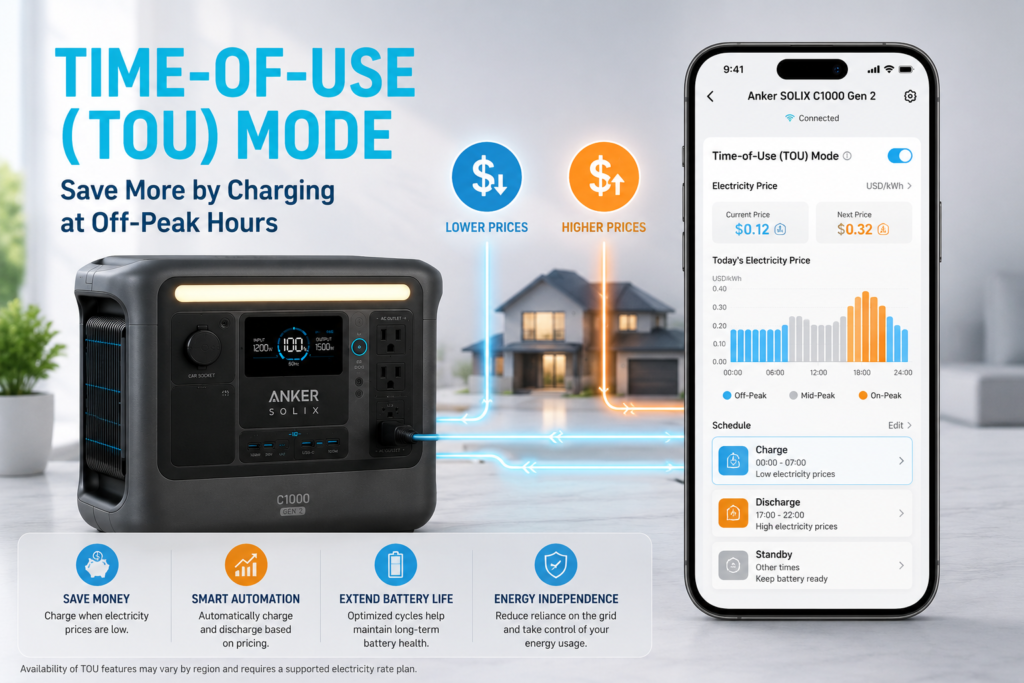
Have you ever wondered why your electricity bill changes depending on the time of day? Many utility companies now charge different rates during peak and off-peak hours. That’s where Time-of-Use (TOU) Mode on the Anker SOLIX App becomes useful.
Instead of charging your portable power station whenever it’s plugged in, TOU Mode lets you automatically charge when electricity is cheapest and, in some situations, use stored battery power when rates are highest. The result is lower energy costs without sacrificing backup power.
Whether you use an Anker SOLIX power station for home backup, remote work, camping, or emergency preparedness, understanding TOU Mode helps you get far more value from your battery. This guide explains exactly how it works, when you should use it, and the mistakes to avoid.
Quick Answer
Time-of-Use (TOU) Mode is a smart charging feature inside the Anker SOLIX app that schedules when your power station charges and discharges based on electricity pricing.
Instead of charging immediately, the battery follows a custom schedule so it can:
- Charge during cheaper off-peak hours
- Reduce charging during expensive peak periods
- Help lower electricity costs
- Keep enough battery reserved for emergencies
For homeowners on time-of-use electricity plans, it can significantly improve long-term savings.
What Is Time-of-Use (TOU) Mode?
TOU Mode is an energy management feature designed for households whose electricity provider charges different prices throughout the day.
Rather than continuously drawing power from the grid, the app lets you create charging schedules that match your utility’s pricing.
For example:
| Time | Electricity Cost | TOU Action |
|---|---|---|
| Midnight–6 AM | Low | Charge battery |
| 6 AM–4 PM | Medium | Idle |
| 4 PM–9 PM | High | Use battery if configured |
| Overnight | Low | Recharge again |
Instead of paying premium evening rates, your stored energy is already available.
Why TOU Mode Matters
Electricity pricing is changing worldwide.
Many providers encourage customers to shift energy use away from busy hours.
Using TOU Mode can help:
- Lower monthly electricity bills
- Reduce demand during expensive hours
- Automatically manage charging
- Prepare the battery before storms
- Improve overall energy efficiency
Although portable power stations are often associated with camping, many owners now use them as home energy storage systems.
How TOU Mode Works
The Anker SOLIX app allows you to create charging windows based on your local electricity schedule.
The process is simple:
- Connect the power station to Wi-Fi.
- Open the Anker SOLIX app.
- Navigate to Energy Management.
- Enable Time-of-Use Mode.
- Enter your peak and off-peak schedule.
- Save the settings.
The power station then follows this schedule automatically.
Want to Know If TOU Mode Is Actually Saving You Money?
Creating a charging schedule is only part of the equation. To maximize your savings, it’s helpful to understand which appliances consume the most electricity during peak hours. A whole-home energy monitor like the Emporia Vue 3 Home Energy Monitor provides real-time insights into your home’s energy usage, helping you identify high-consumption devices and fine-tune your TOU schedule for even greater savings.
For example:
- Charges overnight
- Stops charging during expensive periods
- Keeps battery reserve available
- Resumes charging once rates drop
Everything happens without manual intervention.
When Should You Use TOU Mode?
TOU Mode is most beneficial if:
Your utility company uses peak pricing
Many energy providers charge significantly more between late afternoon and evening.
TOU Mode helps avoid charging during these expensive periods.
You use your power station every day
Daily users benefit the most because the battery cycles regularly.
Instead of manually plugging and unplugging the unit, schedules automate everything.
You have solar panels
Solar users can combine solar production with TOU scheduling.
For example:
- Charge from solar during the day
- Reserve battery for evening use
- Recharge overnight only if needed
This maximizes renewable energy usage.
You use your power station as home backup
Keeping the battery partially charged ensures emergency power remains available without constantly drawing expensive electricity.
Benefits of Time-of-Use Mode
Lower electricity bills
The biggest advantage is cost savings.
Charging during inexpensive hours reduces overall energy costs.
Automatic scheduling
Once configured, the system runs automatically.
No daily adjustments are necessary.
Better battery management
Charging at planned intervals often reduces unnecessary charging cycles compared to constantly topping off the battery.
Convenient backup readiness
You always know the battery will be charged before your selected high-demand periods.
Smarter energy usage
Instead of wasting cheap overnight electricity opportunities, TOU Mode takes advantage of them automatically.
Real-World Example
One Anker SOLIX owner reported using TOU Mode alongside the app’s charging settings to reduce energy costs while maintaining reliable backup power.
The user charged overnight during low-rate hours and kept the battery available during expensive evening periods.
Another owner paired the feature with the unit’s rapid charging capability, allowing the battery to recharge from nearly empty to full in under an hour before peak pricing began.
These examples show that even simple scheduling can improve convenience and reduce operating costs.
Common Mistakes to Avoid
Forgetting your utility schedule
TOU Mode only works if your schedule matches your electricity provider’s pricing.
Double-check your utility company’s rate plan.
Measure Your Biggest Energy Users
Even with the right TOU schedule, you may still be wasting money if you don’t know which appliances use the most electricity. The Kasa Smart Plug Mini with Energy Monitoring lets you monitor the energy consumption of individual devices like refrigerators, coffee makers, gaming PCs, or dehumidifiers. It’s an easy way to identify energy-hungry appliances and decide which ones should run during off-peak hours.
Keeping the battery at 100% permanently
For everyday storage, maintaining a moderate charge level is often healthier than leaving the battery full continuously unless backup readiness is your priority.
Ignoring firmware updates
Firmware updates often improve charging behavior and app stability.
However, avoid updating while critical devices depend on the power station because some users reported temporary output interruptions during updates.
Assuming TOU Mode saves money everywhere
If your electricity costs the same all day, TOU Mode provides little financial benefit.
TOU Mode vs Standard Charging
| Feature | Standard Charging | TOU Mode |
| Charges immediately | ✔ | Scheduled |
| Uses electricity pricing | ✘ | ✔ |
| Automatic schedule | ✘ | ✔ |
| Better for daily home use | Limited | Excellent |
| Potential cost savings | Low | High |
Who Should Use TOU Mode?
TOU Mode is ideal for:
- Homeowners
- Apartment residents with variable electricity pricing
- Solar energy users
- Emergency preparedness enthusiasts
- Remote workers
- RV owners who frequently recharge at home
If you only use your portable power station a few times each year, standard charging is usually sufficient.
Frequently Asked Questions
What is Time-of-Use (TOU) Mode on the Anker SOLIX App?
It is a scheduling feature that automatically charges your power station during lower-cost electricity periods and can help reduce energy costs.
Does TOU Mode save money?
Yes—if your utility company charges different rates throughout the day.
Should I always leave TOU Mode enabled?
Only if your electricity provider offers time-based pricing.
Otherwise, standard charging works just as well.
Can TOU Mode work with solar panels?
Yes.
Many users combine solar charging with TOU scheduling to maximize renewable energy and minimize grid costs.
Reduce Grid Charging Even More
If your portable power station supports solar input, pairing TOU Mode with a Renogy 200W Portable Solar Panel can further reduce your reliance on grid electricity. Charge your battery with solar energy during the day, then use the stored power during expensive peak-rate hours for even greater long-term savings.
Does TOU Mode affect UPS functionality?
No.
UPS operation remains separate. If you’re using your power station as an emergency backup, you can learn more in our guide on What Does UPS Mode Mean on a Portable Power Station?
Can TOU Mode improve battery life?
Indirectly, yes.
Avoiding unnecessary charging and using controlled schedules may reduce excessive charging cycles over time.
Final Verdict
Time-of-Use (TOU) Mode on the Anker SOLIX App is one of the most valuable features for users who charge their portable power station every day.
Instead of charging whenever power is available, TOU Mode intelligently follows your electricity pricing schedule. The result can be lower utility bills, smarter energy management, and a battery that’s always ready when you need it.
For homeowners with variable electricity rates, it’s a feature worth taking the time to configure correctly.
If you’re still deciding whether the Anker SOLIX C1000 Gen 2 fits your needs, read Anker SOLIX C1000 Gen 2 Review: Is It Worth Buying in 2026?. To better understand related features, you can also explore What Is Pass-Through Charging on a Portable Power Station?, What Does Usable Battery Capacity Really Mean?, and What Is Pure Sine Wave Output and Why Does It Matter?


