
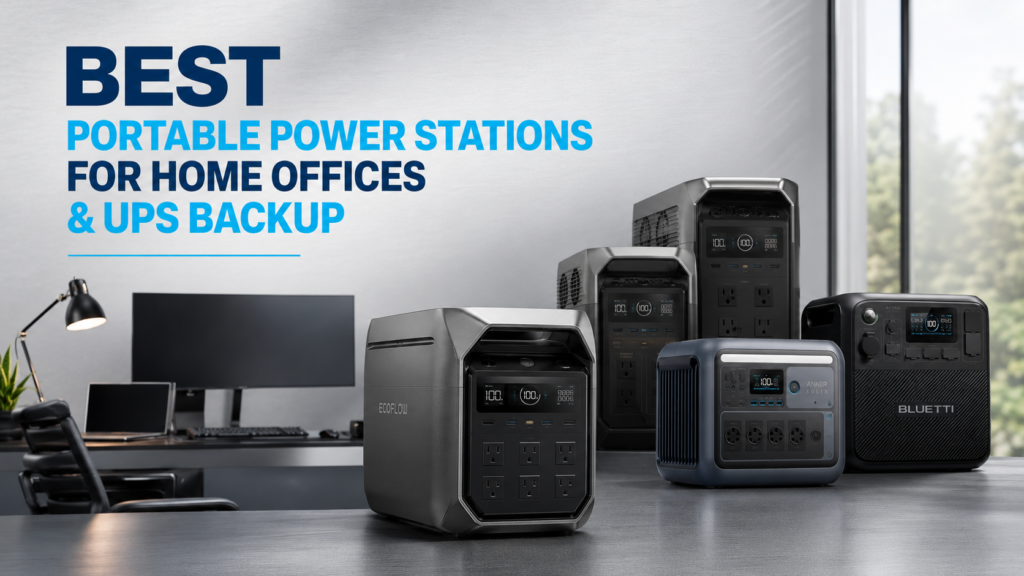
Power outages rarely happen at a convenient time. Whether you’re in the middle of an important video meeting, transferring large files, or running a home business, losing electricity can mean lost productivity—or even lost income. That’s why the best portable power stations for home offices & UPS backup have become an essential investment for remote workers, freelancers, and professionals alike.
Unlike traditional gas generators, modern portable power stations are quiet, emission-free, and safe to use indoors. Many also feature an Uninterruptible Power Supply (UPS) mode that automatically switches to battery power within milliseconds when the grid fails. In this guide, you’ll learn what features matter most, which models offer the best value, and which portable power station is right for your workspace.
Quick Answer: Which Portable Power Station Is Best?
If you want the best balance of performance, UPS capability, battery lifespan, and value, these are our top recommendations:
- Best Overall: EcoFlow DELTA 3 Classic
- Best Expandable Option: EcoFlow DELTA 3 Plus
- Best for Heavy Workstations: EcoFlow DELTA 3
- Best Compact Choice: Anker SOLIX C1000 Gen 2
- Best Budget Alternative: BLUETTI AC180
The right choice depends on your backup time, power requirements, and whether you plan to expand your battery capacity in the future.
Why a Portable Power Station Is Better Than a Traditional UPS
A standard UPS protects your computer for only a few minutes—just enough to save your work and shut down safely.
A portable power station offers far more flexibility because it combines UPS functionality with a much larger battery. Depending on your equipment, it can keep your office running for several hours instead of minutes.
Benefits include:
- Longer runtime
- Multiple AC outlets
- USB-C charging for laptops
- Solar charging capability
- Silent indoor operation
- Backup power for Wi-Fi routers, monitors, NAS devices, and networking gear
If you’re wondering whether one can truly replace a dedicated UPS, read our detailed guide on Can the EcoFlow DELTA 3 Classic Replace a UPS?
Best Portable Power Stations for Home Offices & UPS Backup
1. EcoFlow DELTA 3 Classic — Best Overall
For most home offices, the EcoFlow DELTA 3 Classic hits the sweet spot between portability, fast charging, and reliable backup performance.
Its 1024Wh LiFePO4 battery and 1800W pure sine wave inverter easily handle laptops, monitors, networking equipment, printers, and even refrigerators during outages.
One feature customers consistently praise is the less than 10ms UPS switchover, allowing computers and networking equipment to stay powered without interruption.
Real-world users also appreciate:
- Extremely fast charging (around one hour)
- Quiet cooling fans
- Premium build quality
- Reliable emergency backup
- Excellent companion app
- Compact footprint for office spaces
Many buyers specifically purchased it to replace small desktop UPS systems while gaining significantly longer runtime.
However, there is one important limitation.
The DELTA 3 Classic cannot be expanded with additional batteries.
If future expansion is important, another model may be a better choice.
Pros
- Outstanding UPS performance
- Very fast AC charging
- Quiet operation
- Excellent reliability
- Great value
Cons
- No expansion batteries
- Some app features require an account
- Vehicle charging accessories sold separately
2. EcoFlow DELTA 3 Plus — Best Expandable Choice
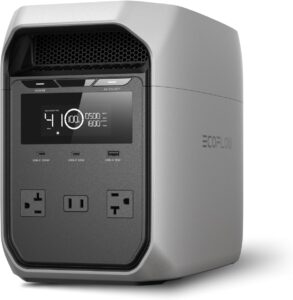
The DELTA 3 Plus builds upon everything users like about the Classic while adding one major advantage: battery expansion.
If your work-from-home setup may grow over time—or if you also want backup for household appliances—the expandable design makes this model a smart long-term investment.
You’ll enjoy:
- Large AC output
- Fast charging
- LiFePO4 battery chemistry
- Excellent UPS functionality
- Expansion battery compatibility
- Solar charging support
For buyers who initially considered the Classic but later realized they wanted longer runtimes, this is often the better purchase.
Pros
- Expandable battery capacity
- Excellent for home offices
- Great future-proofing
- Fast charging
Cons
- Higher purchase price
- Slightly heavier

3. EcoFlow DELTA 3 — Best for High-Power Home Offices
Professionals using powerful desktop PCs, multiple monitors, NAS servers, networking racks, or content creation equipment should consider the standard DELTA 3.
It provides higher flexibility while maintaining EcoFlow’s excellent UPS capabilities and rapid charging technology.
It’s particularly well suited for:
- Video editors
- Software developers
- Designers
- Engineers
- Small business owners
- Remote IT professionals
Because it supports battery expansion, it offers much more flexibility than the Classic model.
If you’re still deciding between EcoFlow models, our comparison guide Best EcoFlow DELTA 3 Classic Alternatives Compared explains the major differences.
Pros
- Expandable
- Excellent UPS mode
- Powerful inverter
- Premium software
- High-quality construction
Cons
- Costs more than the Classic
- Larger footprint
4. Anker SOLIX C1000 Gen 2 — Best Compact Premium Alternative
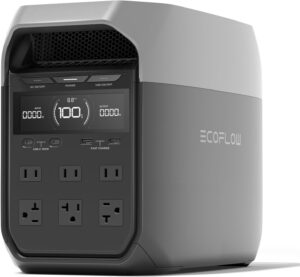
The Anker SOLIX C1000 Gen 2 is an excellent choice if you want a compact, high-performance power station for a home office without sacrificing modern features.
Its LiFePO4 battery, pure sine wave inverter, and fast recharging make it ideal for professionals who need dependable backup power for laptops, dual-monitor setups, networking gear, and small office electronics.
Users especially appreciate its:
- Compact, space-saving design
- Quiet operation
- Fast AC recharging
- Long battery lifespan
- Easy-to-use mobile app
If portability matters as much as backup performance, the SOLIX C1000 Gen 2 is one of the strongest alternatives to EcoFlow.
Pros
- Compact and lightweight
- Long-lasting LiFePO4 battery
- Fast charging
- Excellent build quality
- Reliable UPS functionality
Cons
- Smaller capacity than larger home backup models
- Expansion options depend on configuration
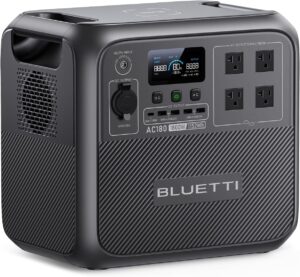
5. BLUETTI AC180 — Best Budget Home Office Backup
If you’re looking for dependable backup power without paying premium prices, the BLUETTI AC180 delivers excellent value.
With a large LiFePO4 battery and a powerful inverter, it’s capable of running essential office equipment during outages while remaining portable enough for camping and emergency use.
The AC180 is well suited for powering:
- Desktop computers
- Monitors
- Wi-Fi routers
- Printers
- Lighting
- Charging multiple mobile devices
It may not include every premium software feature found in EcoFlow models, but it offers impressive performance for its price.
Pros
- Excellent value
- Reliable LiFePO4 battery
- Strong continuous output
- Good solar charging support
- Simple operation
Cons
- App ecosystem isn’t as polished
- Charging speed is slower than EcoFlow’s fastest models
Comparison Table
| Model | Best For | Battery | Expandable | UPS Support |
|---|---|---|---|---|
| EcoFlow DELTA 3 Classic | Best Overall | 1024Wh LiFePO4 | ❌ | ✔ (<10ms) |
| EcoFlow DELTA 3 Plus | Future Expansion | LiFePO4 | ✔ | ✔ |
| EcoFlow DELTA 3 | High-Power Offices | LiFePO4 | ✔ | ✔ |
| Anker SOLIX C1000 Gen 2 | Compact Offices | LiFePO4 | Limited | ✔ |
| BLUETTI AC180 | Budget Buyers | LiFePO4 | Limited | ✔ |
How to Choose the Best Portable Power Station for a Home Office
Before buying, consider these key factors:
Battery Capacity
Battery capacity, measured in watt-hours (Wh), determines how long your devices will run. A 1,000Wh power station can typically keep a laptop, monitor, and Wi-Fi router running for several hours, depending on total power consumption.
UPS Transfer Time
For uninterrupted work, choose a model with a fast UPS switchover. Transfer times under 10 milliseconds are generally sufficient for most computers, networking equipment, and office electronics.
Output Power
Check the continuous AC output rather than just the surge rating. If you use a desktop PC, laser printer, or multiple monitors, an inverter rated around 1,800W provides plenty of flexibility.
Battery Chemistry
LiFePO4 (Lithium Iron Phosphate) batteries are the preferred choice because they offer longer service life, improved thermal stability, and thousands of charge cycles compared to traditional lithium-ion batteries.
Expandability
Think about your future needs. If you may later want to power additional appliances or extend runtime, an expandable system like the EcoFlow DELTA 3 Plus or DELTA 3 offers more flexibility than the non-expandable DELTA 3 Classic.
Common Mistakes to Avoid
Many buyers make the same mistakes when purchasing a portable power station. Avoid these pitfalls:
- Assuming every EcoFlow DELTA 3 model supports expansion batteries. The DELTA 3 Classic does not.
- Ignoring your actual power requirements. Calculate the total wattage of your devices before buying.
- Expecting accessories to be included. Some models require separate purchases for solar connectors or vehicle charging cables.
- Waiting until a storm is approaching. Test your power station and fully charge it before emergency season.
- Overestimating runtime. Battery life depends on the power draw of connected devices.
Best Practices for Reliable UPS Backup
To get the most from your portable power station:
- Keep the battery charged, especially during storm season.
- Test UPS functionality every few months.
- Update firmware when recommended by the manufacturer.
- Use the companion app to monitor battery health and power usage.
- Pair your power station with compatible solar panels for extended outages.
- Plug only essential devices into battery backup to maximize runtime.
Frequently Asked Questions
What is the best portable power station for home offices & UPS backup?
For most users, the EcoFlow DELTA 3 Classic offers the best combination of fast charging, reliable UPS performance, quiet operation, and excellent overall value.
Can a portable power station replace a traditional UPS?
Yes. Many modern portable power stations include UPS functionality while providing much longer backup times than conventional desktop UPS units. However, always verify the transfer time and compatibility with your specific equipment.
How long will a 1024Wh power station run a home office?
A typical home office using a laptop, monitor, router, and LED lighting can often operate for several hours. Actual runtime depends on your total power consumption.
Is LiFePO4 better than lithium-ion?
Yes. LiFePO4 batteries generally last longer, tolerate more charge cycles, and offer improved safety, making them ideal for backup power applications.
Should I choose an expandable power station?
If your power needs may grow, an expandable model is a smart investment. Otherwise, the EcoFlow DELTA 3 Classic remains an excellent option for most home office setups.
Can portable power stations power medical devices?
Many can safely power CPAP machines, oxygen concentrators, and other essential equipment. Always confirm your device’s power requirements and consult the manufacturer’s guidance before relying on battery backup.
Final Verdict
The best portable power stations for home offices & UPS backup provide far more than emergency electricity—they offer peace of mind. Whether you’re attending client meetings, managing servers, or simply keeping your internet online during an outage, a quality portable power station can protect your productivity.
For most professionals, the EcoFlow DELTA 3 Classic stands out thanks to its fast charging, near-instant UPS switchover, quiet operation, and outstanding real-world reliability. If expandability is a priority, the EcoFlow DELTA 3 Plus or EcoFlow DELTA 3 are better long-term choices. Meanwhile, the Anker SOLIX C1000 Gen 2 and BLUETTI AC180 provide excellent alternatives for buyers seeking compact designs or better value.
Investing in the right backup power solution today can save hours of downtime—and plenty of stress—the next time the lights go out.


