

Opening a new portable power station is exciting, but many first-time owners aren’t sure what to do after taking it out of the box. Should you charge it first? Do you need the EcoFlow app? Which accessories are required? Can you start using solar immediately?
This EcoFlow DELTA 3 Classic Setup Guide walks you through the entire process from unboxing to your first successful charge. You’ll also learn how to avoid common mistakes reported by real owners, helping you get the most from your investment whether you’re preparing for home backup, camping, RV travel, or emergency power.
Quick Answer
Setting up the EcoFlow DELTA 3 Classic only takes a few minutes:
- Inspect the contents.
- Fully charge the battery.
- Download the EcoFlow app (optional but recommended).
- Test the AC and USB outputs.
- Connect compatible solar panels if available.
- Store the unit fully charged and ready for emergencies.
If you’re still researching whether this model is right for you, see our Ultimate EcoFlow DELTA 3 Classic Buying Guide.
What’s Included in the Box?
Depending on your retailer, you’ll typically receive:
- EcoFlow DELTA 3 Classic
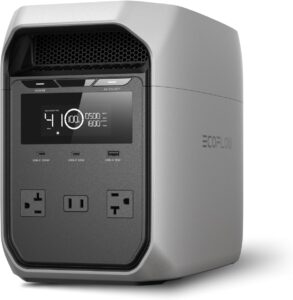
- AC charging cable
- User manual
- Warranty information
Important: Many customer reviews mention that accessories such as the XT60i Solar Cable and Car Charging Cable are often sold separately.
Before your first trip, verify that you have everything you need.
Step 1: Inspect the Power Station
Before plugging anything in, perform a quick inspection.
Check for:
- Shipping damage
- Loose connectors
- Cracks in the housing
- Damaged charging cables
Although defective units appear to be uncommon, inspecting the power station immediately makes returns much easier if something is wrong.
Step 2: Fully Charge Before First Use
One of the best habits is to begin with a full battery.
The DELTA 3 Classic supports extremely fast AC charging, and many owners report reaching a full charge in about one hour under normal conditions.
During charging:
- Place the unit on a flat surface.
- Leave several inches of space around the cooling vents.
- Keep it indoors if possible.
- Avoid covering the ventilation openings.
A full first charge also allows the battery management system to calibrate properly.
Step 3: Download the EcoFlow App
Although the DELTA 3 Classic works without the app, installing it unlocks several useful features.
You can:
- Monitor battery percentage
- View input and output power
- Schedule charging
- Receive firmware updates
- Customize charging speeds
- Track battery health
Some owners appreciate these tools, while others prefer using the unit without creating an account. Reviews indicate that account requirements and internet authentication are among the most common complaints, so it’s worth understanding how the app fits your needs before relying on it during emergencies.
Step 4: Test Every Output
Before relying on the DELTA 3 Classic during a power outage, test each output.
Check:
- AC outlets
- USB-A ports
- USB-C ports
- 12V output (if applicable)
Use familiar devices such as:
- Phone chargers
- Laptop chargers
- Table lamps
- Wi-Fi router
Testing everything early helps identify problems long before an emergency occurs.
Step 5: Set Up Solar Charging (Optional)
If you purchased solar panels, this is the perfect time to test them.
Recommended accessory:
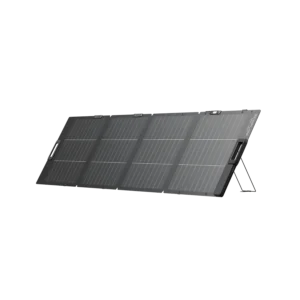
You’ll also need:

Many first-time owners discover they forgot to order the XT60i connector, making solar charging impossible until it arrives.
Position the solar panel in direct sunlight and verify that the display shows incoming solar power. Even a short test confirms everything works correctly before your next camping trip or blackout.
Step 6: Test Vehicle Charging
If you travel frequently, test charging from your vehicle as well.
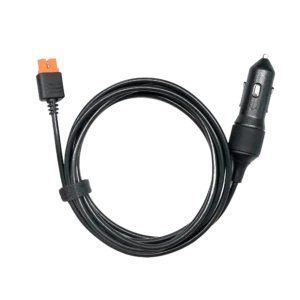
Vehicle charging is slower than AC charging but provides an excellent backup while traveling.
Avoid waiting until your first road trip to confirm compatibility.
Step 7: Organize Your Accessories
A common mistake is storing cables separately from the power station.
Instead, keep everything together using a dedicated organizer.
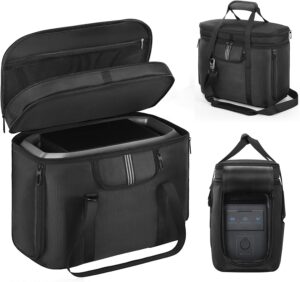
Store:
- Charging cable
- XT60i cable
- Car charging cable
- User manual
- Extension cord
Keeping everything together saves valuable time during emergencies.
Step 8: Run a Real-World Test
Finally, simulate a short power outage.
Connect several devices, such as:
- Refrigerator
- Internet router
- Television
- Laptop
- Lights
Watch how much power they consume and estimate runtime.
Customer reviews consistently recommend performing this test before storm season instead of waiting until you actually lose electricity.
Maintenance Tips After Setup
Once your EcoFlow DELTA 3 Classic is ready to use, a little routine maintenance will help keep it reliable for years.
Follow these best practices:
- Keep the battery charged if it’s intended for emergency backup.
- Test the unit every one to three months.
- Store it in a cool, dry location away from direct sunlight.
- Keep the air vents free from dust and debris.
- Update the firmware periodically if you use the EcoFlow app.
- Recharge the battery before it reaches an extremely low state of charge whenever possible.
Many experienced owners also recommend using the EcoFlow app to monitor battery health and schedule charging during off-peak electricity hours.
Common Setup Mistakes to Avoid
Real customer feedback highlights several mistakes that are easy to avoid.
Assuming Every DELTA 3 Model Is Expandable
One of the biggest misunderstandings is believing the DELTA 3 Classic supports expansion batteries.
It does not.
If battery expansion is important, you’ll need to consider another model in the DELTA lineup.
Forgetting Essential Accessories
Many owners discover after delivery that they still need:
- XT60i Solar Cable
- Car Charging Cable
Ordering these accessories with the power station prevents delays before your first camping trip or emergency.
Waiting Until an Emergency to Test It
Some buyers don’t turn the unit on until a power outage occurs.
Instead:
- Test every outlet.
- Charge the battery fully.
- Run several appliances.
- Confirm solar charging works.
A one-hour test today can prevent major frustration later.
Expecting Unlimited Runtime
The DELTA 3 Classic has a 1,024Wh LiFePO4 battery, but runtime depends entirely on the power draw of your appliances.
For example:
- LED lights may run for many hours.
- Refrigerators typically operate through cycling, extending runtime.
- Electric heaters and high-power appliances can drain the battery much faster.
Understanding your energy needs helps you avoid disappointment.
Best Practices for First-Time Owners
To get the most from your power station:
- Keep it fully charged during storm season.
- Store all charging cables together.
- Label your emergency backup cables if multiple family members use them.
- Test solar charging several times each year.
- Learn the wattage of your most important appliances.
- Avoid blocking the cooling vents during heavy use.
- Review the user manual before connecting unfamiliar equipment.
These simple habits can make the difference between a stressful emergency and a smooth, uninterrupted backup power experience.
Helpful Accessories to Complete Your Setup
A few accessories can make daily use easier and help you stay prepared.
Heavy-Duty Extension Cord
A quality extension cord lets you position the DELTA 3 Classic where it’s safest while still reaching appliances throughout your home or campsite.

Recommended Starter Bundle
If you’re purchasing everything at once, consider this combination:
- EcoFlow DELTA 3 Classic
- 220W Bifacial Solar Panel
- XT60i Solar Cable
- Car Charging Cable
- Heavy-Duty Extension Cord
- Storage Bag
This setup covers the needs of most homeowners, campers, RV travelers, and emergency preparedness plans.
Frequently Asked Questions
Should I fully charge the EcoFlow DELTA 3 Classic before using it?
Yes. A full charge before first use is recommended to verify everything is working properly and ensure the battery is ready for emergencies.
Is the EcoFlow app required?
No. The power station functions without the app. However, the app provides battery monitoring, firmware updates, charging controls, and other useful features.
Does the EcoFlow DELTA 3 Classic include the XT60i cable?
Not always. Customer reviews frequently mention purchasing the XT60i solar cable separately, so check your retailer’s package contents before ordering.
Can I use the EcoFlow DELTA 3 Classic immediately after unboxing?
Yes. However, performing a full charge, testing every output, and checking all accessories before relying on it is recommended.
How often should I test my EcoFlow DELTA 3 Classic?
For emergency preparedness, testing the unit every one to three months helps ensure it’s functioning properly and the battery remains ready for use.
What should I do if my EcoFlow DELTA 3 Classic won’t turn on?
First, verify that the battery has sufficient charge and that the unit has been powered on correctly. If the issue persists, consult the user manual or contact EcoFlow support for troubleshooting and warranty assistance.
For more answers to common ownership questions, visit our Frequently Asked Questions About the EcoFlow DELTA 3 Classic.
Final Verdict
Setting up the EcoFlow DELTA 3 Classic is straightforward, but taking a few extra minutes to test every feature can save time and frustration later. Fully charging the battery, checking all outputs, organizing your accessories, and verifying your solar setup ensures the power station is ready when you need it most.
Real customer experiences also highlight the importance of planning ahead. Many owners wish they had ordered accessories like the XT60i solar cable or car charging cable with the power station instead of waiting until after delivery. By completing your setup correctly from day one, you’ll be better prepared for camping trips, RV adventures, remote work, and unexpected power outages.
Authoritative Resources
- EcoFlow Official Product Page: https://www.ecoflow.com/
- EcoFlow User Manuals: https://manuals.ecoflow.com/
- U.S. Department of Energy – Energy Saver: https://www.energy.gov/energysaver
- National Renewable Energy Laboratory (NREL): https://www.nrel.gov/


