
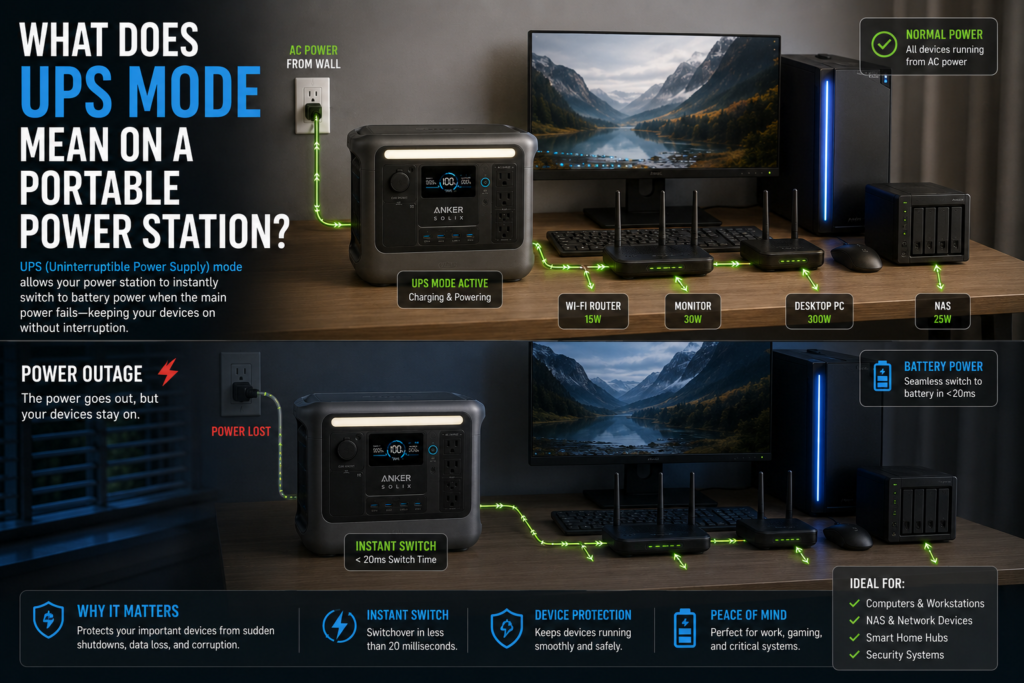
Have you ever wondered what does UPS mode mean on a portable power station and whether you actually need it? Imagine you’re working on an important project when the electricity suddenly goes out. Without backup power, your computer shuts down instantly, unsaved work disappears, and your internet connection drops. A portable power station with UPS mode is designed to prevent exactly that.
In this guide, you’ll learn how UPS mode works, how it differs from ordinary battery backup, when it’s worth using, and its limitations. You’ll also discover which devices benefit the most and how real-world users rely on UPS mode for home backup, remote work, medical equipment, and off-grid setups.
Quick Answer
UPS (Uninterruptible Power Supply) mode allows a portable power station to automatically switch from wall power to its internal battery when utility power fails.
Instead of manually turning the power station on after an outage, your connected devices continue running almost instantly.
Many modern portable power stations advertise transfer times between 10 and 20 milliseconds, which is fast enough for many devices including:
- Wi-Fi routers
- Desktop computers
- NAS storage
- CPAP machines
- Security cameras
- Modems
- Home networking equipment
What Does UPS Mode Mean on a Portable Power Station?
UPS mode combines two jobs into one device.
While electricity is available:
- Wall power passes directly through the power station.
- Connected devices run from utility power.
- The battery remains charged.
If the power suddenly fails:
- The internal inverter automatically switches to battery power.
- Connected devices continue receiving electricity.
- Once grid power returns, the station switches back automatically and begins recharging.
Unlike a standard battery backup that requires manual intervention, UPS mode operates continuously in the background.
How UPS Mode Works
The process is surprisingly simple.
Normal Operation
When plugged into the wall:
- AC electricity powers your devices.
- The battery stays charged.
- Some models use pass-through charging to bypass unnecessary battery cycling.
If you’re unfamiliar with this feature, see our guide on Portable Power Station Battery Drains Too Fast? 9 Ways to Make It Last Longer, which explains how pass-through charging can also reduce unnecessary battery wear.
During a Power Outage
The internal electronics constantly monitor incoming AC power.
If electricity disappears:
- Utility power is detected as unavailable.
- The inverter activates.
- Battery power replaces wall power.
- Devices continue running.
Many premium models complete this transition in around 10 milliseconds, making the interruption almost unnoticeable for many electronics.
Why UPS Mode Matters
UPS mode offers much more than convenience.
Protects Your Work
Unexpected shutdowns can corrupt files or cause lost work.
UPS mode helps prevent interruptions for:
- Desktop PCs
- Home office equipment
- External hard drives
- Network storage
Keeps Internet Running
Many users purchase portable power stations specifically for:
- Wi-Fi routers
- Cable modems
- Fiber ONTs
- Mesh networking systems
Review data also shows customers successfully powering routers and networking gear during multi-hour outages.
Supports Medical Equipment
Portable power stations are commonly used for:
- CPAP machines
- Oxygen concentrators (device dependent)
- Medical monitoring equipment
Because power interruptions can be critical, UPS mode provides additional peace of mind.
Home Backup
Customers frequently report using UPS mode for:
- Refrigerators
- Freezers
- Sump pumps
- Security systems
- LED lighting
During short outages, everything continues operating automatically.
What Devices Benefit Most from UPS Mode?
| Device | Good Candidate? |
|---|---|
| Wi-Fi Router | ✅ Excellent |
| Modem | ✅ Excellent |
| Desktop PC | ✅ Very Good |
| NAS Server | ✅ Excellent |
| Security Camera System | ✅ Excellent |
| CPAP Machine | ✅ Excellent |
| Laptop | Usually unnecessary (already has battery) |
| TV | Good |
| Refrigerator | Good |
| Microwave | Not recommended |
| Coffee Maker | Not ideal |
If your primary concern is powering kitchen appliances, read Why Your Portable Power Station Won’t Run Your Coffee Maker, which explains startup wattage and inverter limitations.
UPS Mode vs Pass-Through Charging
Many people confuse these features.
| UPS Mode | Pass-Through Charging |
| Automatically switches during outages | Allows charging while powering devices |
| Provides backup power | Doesn’t necessarily provide seamless backup |
| Includes transfer switching | May simply charge and discharge simultaneously |
| Designed for emergencies | Designed for convenience |
Some power stations support both simultaneously.
Real-World Customer Experiences
Review data shows owners using UPS mode for:
- Continuous desktop computer backup
- Internet routers during storms
- Starlink Mini terminals
- Remote AI coding workstations
- Home office equipment
- CPAP backup overnight
- Refrigerator backup
- Small office printers
- Business storage units
One technical specification shared by users reports approximately a 10ms transfer time, making it suitable for many networking devices and computers.
However, customer reviews also reveal that firmware updates occasionally interrupt outputs. Therefore, it’s wise to avoid updating firmware while critical equipment is connected.
Best Practices for Using UPS Mode
To get the most reliable performance:
- Keep the battery between 80% and 100% before storms.
- Test UPS mode every few months.
- Update firmware before emergency season.
- Avoid plugging in unnecessary high-power appliances.
- Use quality extension cords if multiple devices are connected.
- Know your power station’s maximum continuous output.
Common Mistakes to Avoid
Running High-Wattage Appliances
Although UPS mode works well for electronics, heaters, microwaves, and coffee makers drain batteries extremely quickly.
Review data shows:
- A 1500W heater may consume 50% of battery capacity in about 30 minutes.
- A microwave can use around 17% of capacity in only a few minutes.
Assuming the Battery Lasts Forever
UPS mode only changes how power switches.
Battery runtime still depends on:
- Battery capacity
- Appliance wattage
- Inverter efficiency
- Ambient temperature
Ignoring Firmware Updates
Several reviewers reported firmware-related issues affecting connectivity or output.
Before relying on UPS mode for emergencies:
- Install available firmware updates.
- Test your connected equipment afterward.
Is UPS Mode Worth It?
For many homeowners, absolutely.
UPS mode is especially valuable if you rely on:
- Home internet
- Remote work
- Medical devices
- Security systems
- Small office equipment
- Network storage
If you simply want occasional camping power, UPS mode is less essential but still a useful bonus.
If you’re evaluating one of the most popular models with this feature, check out Anker SOLIX C1000 Gen 2 Review: Is It Worth Buying in 2026? for a detailed breakdown.
Frequently Asked Questions
What does UPS mode mean on a portable power station?
UPS mode automatically switches your connected devices from wall power to battery power during an outage with minimal interruption.
Is UPS mode the same as pass-through charging?
No. Pass-through charging lets the battery charge while powering devices. UPS mode also includes automatic transfer during power failures.
Can UPS mode run a refrigerator?
Yes, provided the refrigerator’s starting and running wattage remain within the power station’s output limits.
Should I leave UPS mode on all the time?
Yes. Most manufacturers design UPS mode for continuous operation, especially for networking equipment and home office devices.
Does UPS mode drain the battery?
Not significantly while connected to wall power. Most units keep the battery topped off and only discharge during outages.
What devices work best with UPS mode?
Wi-Fi routers, desktop PCs, NAS servers, CPAP machines, security cameras, modems, and networking equipment are among the best candidates.
Final Verdict
What does UPS mode mean on a portable power station? It means your power station acts as an automatic backup power system, seamlessly switching to battery power whenever the grid fails.
For anyone working from home, protecting networking equipment, or relying on medical devices, UPS mode is one of the most valuable features a portable power station can offer. It helps prevent unexpected shutdowns, keeps essential devices online, and provides peace of mind during outages. Just remember that UPS mode doesn’t increase battery capacity—it simply ensures your devices stay powered when you need them most.


