
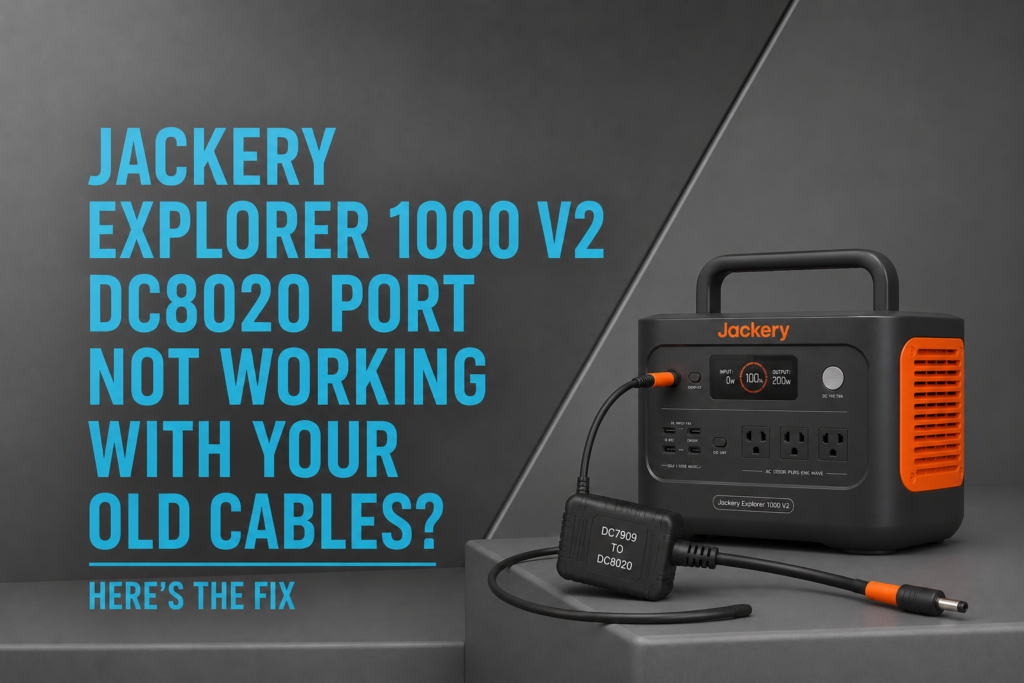
You unpack your new Jackery Explorer 1000 V2, grab your trusted charging cable or solar accessory from an older Jackery model, plug it in—and nothing happens. If this sounds familiar, you’re dealing with one of the most common frustrations reported by Explorer 1000 V2 owners. The issue usually isn’t a faulty power station. Instead, it’s caused by Jackery’s redesigned DC8020 charging port, which is incompatible with many older DC7909 accessories.
Fortunately, the fix is simple. In this guide, you’ll learn why your old cables no longer work, how the new DC8020 port differs, and the easiest way to restore compatibility without replacing all of your existing accessories.
Quick Answer
If your Jackery Explorer 1000 V2 DC8020 port isn’t working with older cables, the problem is usually that your accessories use the older DC7909 connector. Since the Explorer 1000 V2 switched to a DC8020 charging port, older charging cables, car chargers, and some solar accessories can no longer connect directly.
The easiest solution is using the Jackery DC7909-to-DC8020 Adapter Cable, which restores compatibility with many older Jackery accessories.

Why Did Jackery Change to the DC8020 Port?
The Explorer 1000 V2 introduces several hardware improvements over previous generations, including a redesigned charging interface.
The new DC8020 port offers improved power handling and supports faster, more efficient charging. However, the downside is that many existing accessories built for older Explorer models use the smaller DC7909 connector.
As a result, longtime Jackery users often discover that their existing cables no longer fit the new power station.
Which Accessories Are Affected?
The redesigned charging port can affect a wide range of accessories, including:
- Older Jackery charging cables
- Car charging adapters
- Solar charging cables
- Extension cables
- Some third-party charging accessories
- Older SolarSaga connection cables
If you already invested in Jackery accessories over the years, replacing everything can become expensive.
Why Your Old Cables No Longer Work
Although both connectors appear similar, they are physically different sizes.
DC7909 Connector
The older DC7909 connector was used on many previous Jackery Explorer models.
Many users already own:
- Vehicle charging cables
- Solar extension cables
- Portable charging adapters
- Replacement charging cords
Unfortunately, these connectors won’t fit directly into the Explorer 1000 V2.
DC8020 Connector
The Explorer 1000 V2 uses the newer DC8020 connector.
Because of its larger dimensions, older cables simply cannot connect without an adapter.
This is a physical compatibility issue—not a software or charging fault.
The Best Fix: Use a DC7909-to-DC8020 Adapter
Instead of replacing all of your existing accessories, the simplest solution is using the official Jackery DC7909-to-DC8020 Adapter Cable.
It allows many older Jackery accessories to work with the Explorer 1000 V2 by converting the connector to the new DC8020 standard.
Benefits include:
- Restores compatibility with older charging cables
- Works with many existing Jackery solar accessories
- Saves money by avoiding replacement cables
- Compact and easy to carry
- Designed specifically for Explorer V2 models
Jackery Explorer 1000 V2
If you’re still deciding whether to buy the power station itself, check out our comprehensive Jackery Explorer 1000 v2 Review: Is It Worth Buying in 2026? for a complete breakdown of its performance, charging speed, battery life, and overall value.
When an Adapter May Not Be Enough
Although the adapter solves the connector problem, it cannot fix every charging issue.
For example, an adapter will not help if:
- The accessory outputs the wrong voltage
- The charging cable is damaged
- The solar panel isn’t compatible with the Explorer 1000 V2
- A third-party adapter is incorrectly wired
Therefore, always verify that your charging accessory meets Jackery’s supported input specifications.
If the problem involves solar charging rather than cable compatibility, our article Jackery Explorer 1000 V2 Not Charging From Solar? Panel Compatibility Fix covers common causes such as incompatible solar panels, incorrect connectors, and how to choose a compatible SolarSaga panel.
Jackery provides compatibility information for supported accessories in its official documentation.
Can You Use Third-Party Adapter Cables?
Yes, but proceed carefully.
Many third-party adapters advertise compatibility with the Explorer 1000 V2. However, customer reviews frequently mention inconsistent quality and wiring differences.
Potential issues include:
- Loose connections
- Incorrect pin configuration
- Lower-quality materials
- Charging interruptions
For equipment you depend on during travel, camping, or emergency backup, an official adapter is generally the safer choice.
Tips for Reliable Charging
To avoid future compatibility problems:
Label Older Accessories
If you own multiple Jackery models, label cables by connector type.
Check Connector Size Before Buying
Don’t assume all Jackery accessories use the same connector.
Always verify whether the accessory uses:
- DC7909
- DC8020
Buy Official Accessories When Possible
Official accessories are tested to work with supported Explorer models and reduce compatibility headaches.
Is the New Connector Actually Better?
Despite the inconvenience, the redesigned connector offers several benefits:
Pros
- Improved charging performance
- Better compatibility with newer accessories
- More reliable connection
- Supports updated hardware
Cons
- Older accessories need an adapter
- Can confuse first-time buyers
- Additional cost if you already own several cables
Overall, the long-term improvements outweigh the short-term inconvenience for most users.
Frequently Asked Questions
Why doesn’t my old Jackery charging cable fit the Explorer 1000 V2?
The Explorer 1000 V2 uses a DC8020 charging port, while many older Jackery accessories use the smaller DC7909 connector.
Can I use my old SolarSaga cables?
Yes, in many cases, but you’ll typically need a compatible DC7909-to-DC8020 adapter.
Does the Jackery DC7909-to-DC8020 adapter affect charging speed?
No. The adapter simply converts the connector type. Charging performance still depends on the connected power source and accessory specifications.
Is the DC8020 port better than DC7909?
Yes. The newer connector is designed for improved durability and charging performance, though it sacrifices backward compatibility.
Will every third-party cable work with the adapter?
Not necessarily. The accessory must also meet Jackery’s supported voltage and current requirements.
Is the Explorer 1000 V2 still worth buying despite the connector change?
Absolutely. The connector change is a minor inconvenience compared to the power station’s fast charging, LiFePO₄ battery, and overall performance. For a full overview, read our 10 Jackery Explorer 1000 v2 Problems You Should Know Before Buying.
Final Verdict
If your Jackery Explorer 1000 V2 DC8020 port isn’t working with your old cables, the issue is almost always due to the switch from the older DC7909 connector to the new DC8020 standard. Fortunately, you don’t need to replace your existing charging accessories. The Jackery DC7909-to-DC8020 Adapter Cable provides a simple, affordable way to restore compatibility with many older Jackery charging cables, car chargers, and solar accessories. Before replacing expensive equipment, try the adapter first—it can save money while keeping your existing gear useful for years to come.


