

If your Jackery Explorer 1000 V2 isn’t charging from solar, you’re not alone. Many buyers purchased what was marketed as a “solar generator” only to discover that solar panels aren’t included—and even some third-party panels advertised as compatible fail to charge the unit. The culprit is usually Jackery’s redesigned charging port and proprietary connection system.
The good news is that this problem is usually easy to fix. In this guide, you’ll learn why the Explorer 1000 V2 rejects certain solar panels, which panels actually work, and how to restore reliable solar charging without wasting money on incompatible accessories.
Quick Answer
If your Jackery Explorer 1000 V2 is not charging from solar, the most common causes are:
- Using an incompatible third-party solar panel
- Using the wrong adapter or connector
- Connecting through an unsupported solar charge controller
- Insufficient solar voltage or poor sunlight
- Using older Jackery cables designed for previous models
The simplest and most reliable solution is using the official Jackery SolarSaga 200W Portable Solar Panel, which is designed specifically for the Explorer 1000 V2 and eliminates compatibility problems.

Why Does the Jackery Explorer 1000 V2 Reject Some Solar Panels?
Unlike earlier Jackery models, the Explorer 1000 V2 introduced a redesigned solar charging interface.
While this improves charging performance, it also means many existing accessories no longer work without the correct hardware.
Many customer reviews report situations like:
- Solar panels producing power but the Jackery shows 0W input
- Compatible-labeled third-party panels failing to charge
- Older Jackery cables working on previous models but not the V2
- Extra adapters being required after purchase
These experiences appear repeatedly in customer feedback.
The Biggest Source of Confusion: “Solar Generator”
One of the most common complaints is that buyers expected solar panels to be included.
In reality:
- The Explorer 1000 V2 includes the power station.
- Solar panels are sold separately unless you purchase a bundle.
Although this is common throughout the portable power station industry, many users feel the product listing doesn’t make it obvious enough.
Before buying, always confirm whether you’re purchasing:
- Power station only
- Power station + solar panel bundle
Why Third-Party Solar Panels Often Don’t Work
Many portable power stations accept almost any solar panel within their supported voltage range.
The Explorer 1000 V2 is different.
Users have reported problems with panels from multiple manufacturers despite using adapters marketed as compatible.
Common reasons include:
Proprietary Connector
Jackery uses its own charging connector rather than the more common XT60 connection found on many competing brands.
Even if a cable physically fits, the electrical specifications may not match.
Incorrect Voltage
Portable solar panels vary widely in:
- Open-circuit voltage (Voc)
- Operating voltage (Vmp)
- Current output
If the voltage falls outside Jackery’s supported input range, charging may never begin.
Unsupported Adapters
Many inexpensive adapters sold online claim compatibility but are wired differently.
As a result, the Explorer simply refuses to accept incoming power.
The Best Fix: Use the Official SolarSaga 200W Panel
Instead of troubleshooting multiple adapters and cables, the easiest solution is using Jackery’s own panel.
The Jackery SolarSaga 200W Portable Solar Panel is designed specifically for Explorer-series power stations and avoids the connector issues commonly reported with third-party products.
Benefits include:
- Guaranteed connector compatibility
- Correct voltage and current output
- High solar conversion efficiency
- Foldable portable design
- No guessing about adapters
If your goal is dependable off-grid charging, this is the simplest long-term solution.
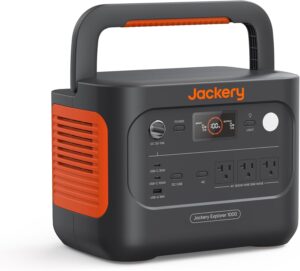
Jackery Explorer 1000 V2
If you haven’t purchased the power station yet, read our detailed Jackery Explorer 1000 v2 Review: Is It Worth Buying in 2026? to understand its strengths and limitations before investing.
Other Things to Check Before Assuming Your Panel Is Incompatible
Inspect the Cable
Loose barrel connectors are surprisingly common.
Ensure:
- The connector is fully seated.
- The cable isn’t damaged.
- No bent pins are present.
Test in Full Sunlight
Solar charging depends heavily on sunlight.
For best performance:
- Point panels directly toward the sun.
- Avoid shade.
- Keep panels clean.
- Minimize cable length.
Even partial shading can reduce charging dramatically.
The U.S. Department of Energy explains how shading significantly reduces solar panel performance.
Avoid Solar Charge Controllers
Many portable solar panels include their own charge controller.
The Explorer 1000 V2 already contains an MPPT solar charge controller internally.
Connecting through another controller can prevent charging altogether.
Instead, connect compatible panels directly to the Jackery whenever recommended by the manufacturer.
Jackery’s official documentation also recommends using compatible solar panels connected directly to the unit.
Should You Buy an Adapter Instead?
If you already own expensive solar panels, purchasing the correct adapter may be worthwhile.
However, many users report inconsistent results depending on:
- Panel brand
- Connector type
- Cable quality
- Voltage output
Therefore, if dependable charging matters—especially during emergencies—the official SolarSaga panel is generally the safer investment.
How Does the Explorer 1000 V2 Compare to Other Power Stations?
Some competitors use industry-standard XT60 connectors, making third-party solar panels easier to use.
If solar flexibility is your highest priority, you may also want to compare the Explorer against competing models.
Our comparison guide EcoFlow DELTA 3 Classic vs Jackery Explorer 1000 v2: Which Is Right for You? explains the differences in charging systems, features, and overall value.
Common Mistakes to Avoid
Avoid these mistakes if your Explorer 1000 V2 won’t charge from solar:
- Buying the power station without realizing panels are sold separately.
- Assuming every 200W panel is compatible.
- Using unsupported adapters.
- Connecting through a solar charge controller.
- Charging in partial shade.
- Reusing older Jackery charging cables without verifying compatibility.
Frequently Asked Questions
Why is my Jackery Explorer 1000 V2 not charging from solar?
The most common reason is an incompatible solar panel, connector, or adapter. Using the official SolarSaga panel usually resolves the issue.
Can I use third-party solar panels with the Jackery Explorer 1000 V2?
Sometimes, yes. However, compatibility depends on the connector, voltage, and wiring. Many users report inconsistent results with third-party panels.
Does the Jackery Explorer 1000 V2 include solar panels?
No. Unless you purchase a bundle, the power station is sold without solar panels.
Which solar panel works best with the Explorer 1000 V2?
The Jackery SolarSaga 200W Portable Solar Panel is the most reliable option because it is designed specifically for this model.
Can adapters fix compatibility problems?
Sometimes. However, adapters don’t guarantee compatibility if the solar panel itself doesn’t meet Jackery’s input requirements.
Is the Explorer 1000 V2 still worth buying?
Yes, especially if you value fast AC charging, portability, and battery quality. Just be aware of its proprietary solar charging system before purchasing. You can also read our 10 Jackery Explorer 1000 v2 Problems You Should Know Before Buying for a balanced overview.
Final Verdict
If your Jackery Explorer 1000 V2 is not charging from solar, the issue is usually not a defective power station. Instead, it’s most often caused by incompatible solar panels, proprietary connectors, or incorrect adapters. While troubleshooting cables and voltage can sometimes solve the problem, the most reliable fix is pairing the Explorer 1000 V2 with the official Jackery SolarSaga 200W Portable Solar Panel, which eliminates compatibility headaches and provides dependable charging in the field.
Before purchasing any accessories, verify connector compatibility and input specifications to avoid unnecessary frustration. A little planning can save both time and money while ensuring your power station performs as expected.


