

Sleeping with a CPAP machine doesn’t mean you have to give up camping or off-grid adventures. With the right setup, the Jackery Explorer 1000 V2 CPAP setup can provide reliable overnight power while leaving enough battery for lights, phones, and other essentials. The secret isn’t simply buying a large power station—it’s learning how to minimize power consumption, recharge efficiently during the day, and prepare for changing weather conditions.
In this guide, you’ll learn how to maximize CPAP runtime, choose the right accessories, prevent battery-draining mistakes, and build a dependable backup system for multi-day camping trips.
Quick Answer
For the longest CPAP runtime:
- Use a DC CPAP cable instead of the AC power brick.
- Disable the heated humidifier if possible.
- Turn off the heated hose.
- Recharge the Jackery every day using SolarSaga panels.
- Keep the battery above 20% whenever possible.
- Carry a backup charging option for cloudy weather.
Following these practices can increase runtime dramatically compared to using a standard AC adapter.
Why the Jackery Explorer 1000 V2 Is Great for CPAP Users
The Jackery Explorer 1000 V2 combines a 1,070Wh LiFePO4 battery, a 1,500W pure sine wave inverter, and fast solar charging into a portable package that’s ideal for camping and emergency backup.
Unlike noisy fuel generators, it operates silently, making it perfect for overnight use inside a tent, RV, or cabin.
If you’re still deciding whether this capacity is right for your therapy, check out Is the Jackery Explorer 1000 v2 Overkill for a CPAP?
Typical CPAP Power Consumption
One of the biggest misconceptions is that all CPAP machines use the same amount of electricity.
In reality, runtime depends on:
- CPAP brand
- Pressure settings
- Humidifier use
- Heated tubing
- Ambient temperature
- DC vs AC power
Here’s a realistic overnight estimate.
| Setup | Approximate Power Draw | Estimated Runtime on 1,070Wh |
|---|---|---|
| CPAP (DC, humidifier OFF) | 20–40W | 2–4 nights |
| CPAP (AC, humidifier OFF) | 30–50W | 2–3 nights |
| CPAP (heated humidifier ON) | 60–90W | About 1 night |
| CPAP (humidifier + heated hose) | 80–120W | Less than 1 night |
Your actual runtime depends on your machine and settings, but using DC power without heated accessories offers the best efficiency.
Use a DC CPAP Cable for Longer Runtime
One of the easiest ways to extend battery life is to skip the AC inverter altogether.
Most CPAP machines normally convert power like this:
Jackery DC Battery → AC Inverter → CPAP Power Brick → CPAP
Every conversion wastes energy.
Instead, use:
Jackery DC Output → DC CPAP Cable → CPAP
This simple change can improve efficiency by 30–50%, depending on your CPAP model.
Recommended Gear
DC CPAP Converter Cable
Using the correct DC cable is the single biggest improvement you can make to your off-grid CPAP setup.
Hard Shell Travel CPAP Case
Protects your CPAP machine, mask, tubing, and power supplies while traveling.
Recharge Every Day with Solar
Even if your CPAP only consumes a fraction of the battery overnight, recharging every day provides peace of mind.
The Jackery SolarSaga 100W or 200W folding solar panels are the easiest solution.
Jackery SolarSaga Folding Solar Panel
Recharge your power station during daylight so you’re ready for another night.
For best performance:
- Place panels in direct sunlight.
- Adjust the angle every few hours.
- Keep the Jackery itself in the shade.
- Avoid even partial shading on the panels.
Important: The Explorer 1000 V2 uses dual DC8020 solar input ports. If you’re using older Jackery SolarSaga panels or accessories with the older DC7909 connector, you’ll need a DC7909-to-DC8020 adapter.
If you’re experiencing compatibility problems, see Jackery Explorer 1000 V2 DC8020 Port Not Working With Your Old Cables? Here’s the Fix.
Build a Reliable Nighttime Setup
A comfortable sleeping setup isn’t only about power.
Arrange your equipment so that:
- The Jackery sits on a stable surface.
- Air vents remain unobstructed.
- CPAP tubing isn’t kinked.
- Power cables aren’t trip hazards.
- Battery percentage is checked before bed.
A travel CPAP case also keeps everything organized between campsites.
Deal With Cold Weather and Prevent “Rainout”
Cold nights are one of the biggest challenges for CPAP users camping off-grid. When warm, humid air travels through a cold hose, moisture can condense inside the tubing. This is commonly called rainout, and it can cause water droplets to reach your mask, interrupting sleep and making therapy uncomfortable.
Fortunately, there are several ways to reduce or eliminate this problem without using extra battery power.
Keep Your CPAP Inside the Tent
Avoid placing your CPAP directly on the cold ground or outside the tent. Instead:
- Place it on a small table or storage bin.
- Keep it away from tent walls where condensation forms.
- Protect it from dust and moisture.
- Ensure the air intake remains unobstructed.
Use an Insulated Hose Cover
A fleece hose cover helps retain warmth inside the tubing, reducing condensation on chilly nights while adding virtually no power consumption.
Other helpful accessories include:
These inexpensive accessories can significantly improve comfort during cold-weather camping.
Reduce Power Consumption by Managing Humidity
For many CPAP users, the heated humidifier is the single largest source of overnight power consumption.
If conditions allow, consider these options:
- Turn the heated humidifier off.
- Lower the humidity setting.
- Disable heated tubing.
- Use a waterless Heat Moisture Exchanger (HME) instead.
An HME captures moisture from your breath and returns it during inhalation, providing comfortable therapy without consuming electricity. It’s an excellent option for campers trying to maximize battery life.
If you prefer active humidification, carry small travel bottles of distilled water rather than large containers.
Recharge Efficiently During the Day
A successful multi-day camping trip depends on replacing the energy used overnight.
For the best charging performance:
- Set up your SolarSaga panels as soon as the sun rises.
- Reposition them every two to three hours.
- Keep the Jackery Explorer 1000 V2 in the shade while the panels remain in full sunlight.
- Charge phones, tablets, and other devices during peak solar hours so they draw power directly from the panels instead of the battery.
On sunny days, a compatible folding solar panel can recover much of the energy your CPAP consumed overnight, helping you stay off-grid for several days.
Build a Reliable Backup Plan
Even the best solar setup can’t guarantee perfect weather. Cloudy conditions, dense forests, or unexpected equipment issues can reduce charging performance, so it’s wise to have a backup plan.
Consider adding these layers of redundancy:
Secondary Charging Method
A 12V Jackery car charging cable lets you recharge while driving between campsites or exploring nearby areas.
If you need one, see our guide Jackery Explorer 1000 V2 Car Charger Cable: Why It’s Sold Separately.
Backup CPAP Battery
A compact CPAP battery pack, such as a Medistrom or Pilot-24 Lite, can serve as an emergency reserve if your primary power station runs low.
Monitor Battery Usage
A Bluetooth battery monitor or inline DC watt meter helps you track:
- Battery percentage
- Real-time power draw
- Overnight energy consumption
- Remaining runtime
Knowing your actual nightly usage makes it much easier to plan multi-day trips with confidence.
Recommended Accessories
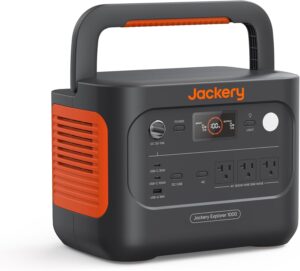
Jackery Explorer 1000 V2 Portable Power Station
Reliable, quiet power for CPAP therapy, camping, and emergency backup.
Jackery SolarSaga Folding Solar Panel
Recharge your power station every day for extended off-grid trips.

DC CPAP Converter Cable
Improves efficiency by eliminating unnecessary inverter losses.
Hard Shell Travel CPAP Case
Protects your CPAP equipment during travel.
Insulated CPAP Hose Cover
Reduces condensation inside the tubing during cold nights.
Inline DC Watt Meter
Measures real-time power consumption and total watt-hours used.
Battery Monitor
Tracks battery state of charge and estimated runtime.
Solar Extension Cable
Allows solar panels to remain in direct sunlight while the Jackery stays safely in the shade.
Additional Helpful Accessories
- Waterless CPAP HME filters
- Thermal CPAP mask strap covers
- Hanging CPAP hose holder
- Distilled water travel bottles
- Solar panel ground anchors
- Portable CPAP battery backup
- Digital tent hygrometer and thermometer
Frequently Asked Questions
Can the Jackery Explorer 1000 V2 run a CPAP all night?
Yes. Most CPAP machines can run through an entire night on the Jackery Explorer 1000 V2. Using a DC cable and disabling heated accessories can significantly increase runtime.
How many nights will the Jackery Explorer 1000 V2 power a CPAP?
Depending on your machine and settings, you can typically expect 2–4 nights when using DC power without a heated humidifier. Higher power settings and heated features will reduce runtime.
Should I use AC or DC with the Jackery Explorer 1000 V2?
Whenever possible, use a compatible DC CPAP cable. It reduces conversion losses and can extend battery life by approximately 30–50% compared to using the AC inverter.
Can I recharge the Jackery Explorer 1000 V2 with solar every day?
Yes. Compatible SolarSaga panels can replenish much of the energy used overnight, especially during sunny conditions with proper panel positioning.
What is rainout, and how can I prevent it?
Rainout is condensation that forms inside CPAP tubing during cold weather. An insulated hose cover, a hose hanger, and lower humidity settings can help prevent it.
Is the Jackery Explorer 1000 V2 enough for emergency home CPAP backup?
For many users, yes. It provides a reliable backup during power outages, especially when paired with efficient DC operation and conservative power settings.
Final Verdict
A properly planned Jackery Explorer 1000 V2 CPAP setup allows you to sleep comfortably almost anywhere without sacrificing your therapy. By switching to a DC CPAP cable, reducing humidifier use, preventing rainout with insulated accessories, and recharging with SolarSaga panels each day, you can dramatically extend runtime and enjoy worry-free nights off the grid.
The most dependable setup combines smart energy management with practical backup options, such as a car charging cable, battery monitor, and emergency CPAP battery. Whether you’re camping for a weekend or preparing for unexpected power outages, the Jackery Explorer 1000 V2 offers a quiet, portable, and reliable power solution for CPAP users.


